Gnome Metronome by Songkeeper
A free iPhone metronome by Songkeeper with accurate generated clicks, clear visual feedback, accent patterns, and saved presets.
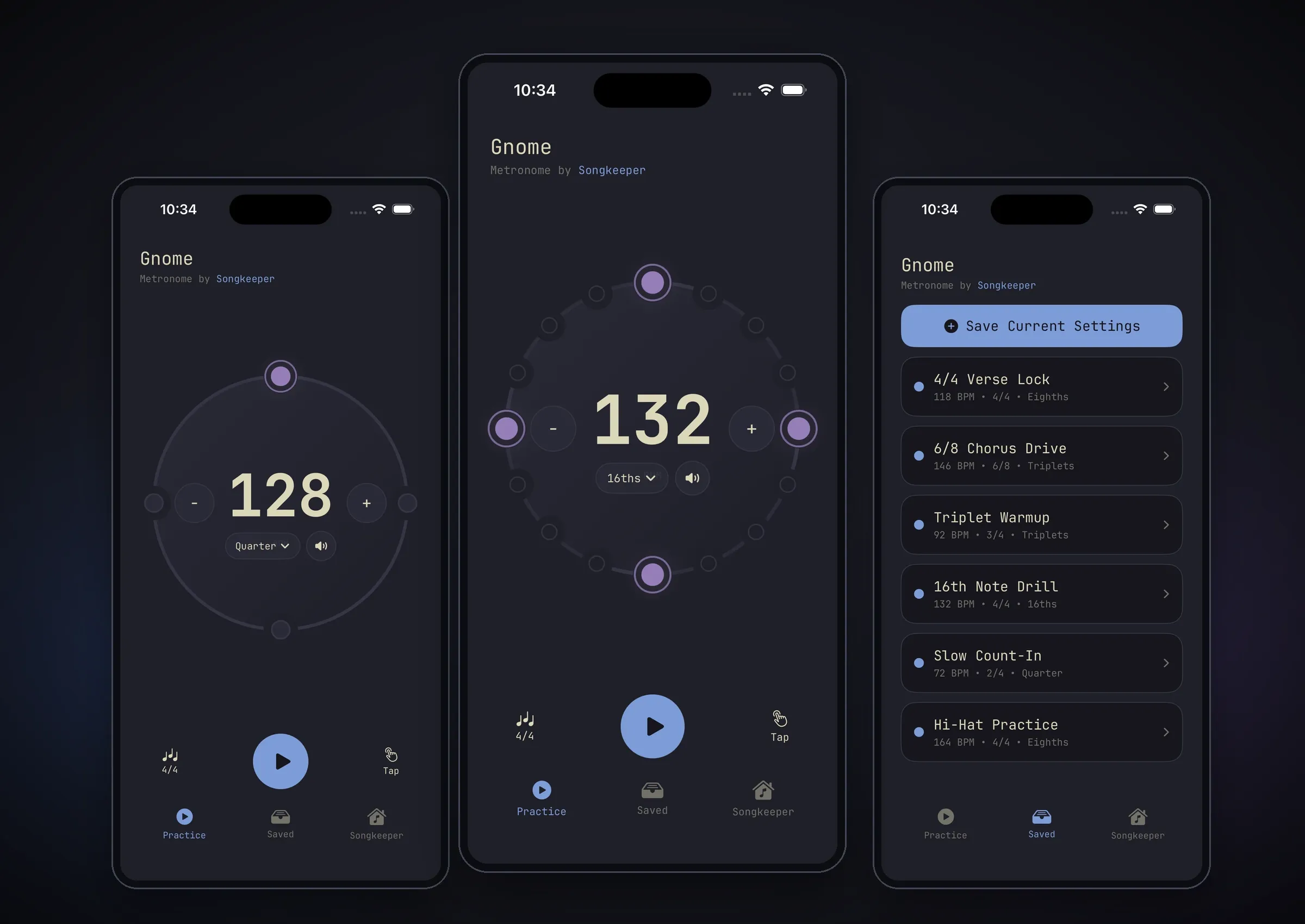
Gnome Metronome is a free iPhone metronome by Songkeeper. It is a focused companion utility for musicians: dial in a tempo and meter, program subdivisions and accent patterns, save reusable presets, and practice without ads getting in the way.
Problem
I wanted a simple, accurate metronome with strong visual feedback and no ads.
The product goal was straightforward: make something useful for musicians on its own, then use it as a lightweight way to introduce people to Songkeeper. The technical goal was to avoid a timer-driven toy metronome and build the click around a real audio clock, so the visuals and playback stayed aligned.
It was also an experiment in speed. After building Vocal Dojo, I already had a working mental model for background audio, render-thread timing, route changes, interruptions, lock-screen behavior, and diagnostics. Gnome tested how quickly that prior work could become a smaller shipped app.
Solution
Gnome keeps the app narrow: open it, set the click, practice.
- generated click sounds with multiple tone options
- accurate playback from an AVFoundation render callback
- audio-clock-driven phase updates for the circular beat ring
- background audio and lock-screen controls
- subdivision-level accent editing
- local saved presets for common practice settings
The result is a small free tool that is useful on its own while also pointing musicians toward Songkeeper.
What I built
- An iPhone-only SwiftUI app for metronome practice.
- A circular ring UI where every visible tick maps to an audible beat or subdivision.
- Tempo controls with step buttons, drag scrubbing, and tap tempo.
- Meter support for 2/4, 3/4, 4/4, and 6/8.
- Subdivisions for quarter notes, eighths, triplets, and 16ths.
- Accent toggling on any visible tick, not just whole beats.
- Five generated click palettes: Classic, Woodblock, Clave, Soft Tap, and Hi-Hat.
- Saved presets persisted locally on device.
- Now Playing / Control Center play-pause support.
- A Songkeeper tab that connects the free utility back to the broader music-workflow product.
Technical architecture
Gnome is built with SwiftUI, AVFoundation, MediaPlayer, Swift Atomics, and XcodeGen.
The app is split into a small set of explicit layers:
- UI/view model: SwiftUI and Observation own user-facing state, saved presets, tap tempo, and transport actions.
- Audio boundary:
MetronomeAudioEngineProtocolgives the UI a main-actor interface for play, pause, resume, stop, tempo, meter, subdivision, sound, and accent updates. - Runtime:
MetronomeAudioRuntimeowns theAVAudioEngine,AVAudioSourceNode, playback audio session, serial audio queue, route/interruption handling, and media-services reset recovery. - Scheduling: pure schedule types expand tempo, meter, subdivision, sound, and accents into deterministic audible/visible ticks.
- Render-thread state: Swift Atomics publish the active schedule, playback state, phase, counters, and diagnostics without pushing SwiftUI state or allocation into the audio callback.
The render callback writes generated click waveforms directly into the output buffer. UI animation consumes phase snapshots from the same render-clock model, so the ring follows the audio instead of becoming the source of truth.
Product decisions
The product is intentionally restrained.
Gnome is not trying to be a DAW, looper, song-storage app, cloud-sync product, or Songkeeper account surface. It is a free companion tool and a small marketing surface for Songkeeper: open it, set the click, practice.
A few decisions kept the app focused:
- use system volume instead of adding a dedicated volume UI
- mix with other audio so it can run alongside backing tracks
- stage meter and subdivision changes until the next measure boundary
- preserve tempo changes immediately without resetting phase
- remap accents only when the new meter/subdivision has an exact matching measure fraction
- always launch stopped, while still restoring musical settings and saved presets
Those choices kept the app understandable while preserving the parts that matter for musicians: timing, accents, and quick setup.
Agent-assisted development
Gnome was also an AI-agent development experiment.
Most of the implementation was generated by agents. The interesting part was not whether an agent could produce a metronome from scratch, but how fast it could move with a proven template. Vocal Dojo had already solved many of the hard audio playback problems, so Gnome could reuse those patterns in a much smaller app.
That made the project mostly about adaptation and refinement: shaping the UI, keeping the scope small, verifying the timing model, and turning the Songkeeper connection into a useful free tool rather than a heavy product funnel. With the audio backbone already understood, the app came together extremely quickly.
Current status
Gnome Metronome is shipped and public on the App Store. The repository is public at songkeeper/gnome.
What I learned
- Prior work compounds: solving hard audio problems once made the next app much faster.
- Agents are much more useful when they can follow a proven architecture instead of inventing one from scratch.
- My experience with Vocal Dojo helped me keep the interface minimal and clean.
- A free utility can still be a real product surface when it solves a concrete problem.
- Scope control mattered as much as implementation speed.